AI Character Consistency: Maintaining Stable Identities Across Images
Learn how to achieve AI character consistency by differentiating fixed identity anchors from variable shot elements, using reference images effectively, and structuring your prompts for stable character generation.
 Genvizu Team3 min read
To improve AI character consistency, the most crucial aspect isn't an infinitely long character description, but rather distinguishing between "identity anchors that must remain fixed" and "shot variables allowed to change in this iteration." Reference images handle identity, stable character descriptions handle repeated confirmation, and poses and expressions are modified per image.
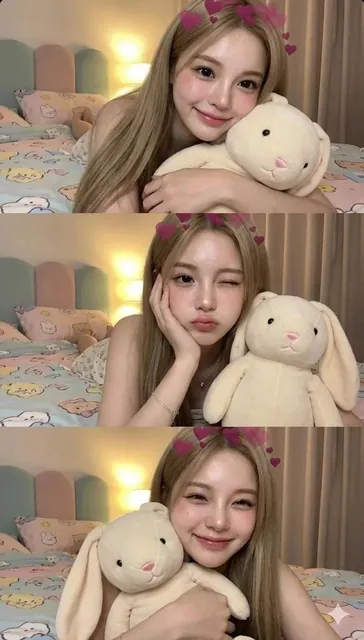
This Bedroom Girl Trio gallery example places the same character into three vertical frames, changing only the pose and expression in each, while keeping the room, camera distance, lighting, clothing, and main props consistent. It demonstrates a key method: first lock down common conditions, then describe the differences for each shot.
Reference Images Are More Important Than Repeated Adjectives
When generating solely with text, the same "long golden hair, blue eyes, round face" can still correspond to many different characters. Models that support reference images can obtain more specific identity signals from facial structure, feature proportions, hairline, and overall temperament.
Runway's guide to consistent characters also uses character reference images as an important method for maintaining characters across scenes. When selecting reference images, pay attention to:
-
Clear facial features, avoiding severe occlusion and extreme filters.
-
Even lighting, where skin tone and feature boundaries are discernible.
-
Start by establishing the basic identity with a medium close-up, either front-facing or slightly angled.
-
After achieving a satisfactory character, generate character concept art from more diverse angles.
If using real person photos, ensure you have usage rights and do not treat strangers' faces as freely reusable material.
Establish Fixed Character Anchors
Character anchors should only retain features that genuinely affect recognition and should be phrased identically in every generation. They can be divided into four categories:
Identity: adult woman, soft heart-shaped face, fair skin with natural pink undertones
Features: large almond eyes, small nose, a small mole on the left cheek
Hair: long straight milk-tea ash-blonde hair, center part, waist length
Fixed look: white top, thin silver necklace, cream-colored bunny plush
Avoid changing "ash blonde" to "platinum blonde" each round, or suddenly adjusting age, face shape, and hair length. While these terms might be similar to humans, they represent new generation conditions for the model.
Separate Fixed and Variable Elements in Your Prompt
Multi-image prompts can first declare global rules, then list variations per frame:
GLOBAL LOCK:
same adult character, identical facial identity, hairstyle, outfit,
bedroom, eye-level camera, soft warm lighting

FRAME 1: hugging the plush, looking to the side
FRAME 2: hand supporting cheek, one eye winking
FRAME 3: smiling toward camera, face close to the plush
This writing style informs the model that the changes occur in pose and expression, not character identity. For sequential stories, you should also first fix the character, clothing, and visual style, then change only one major variable in the scene or action at a time.
Expand Available Angles with Character Concept Sheets
Before formally producing comics, brand characters, or storyboards, you can generate a character concept sheet including front, three-quarter, side, and full-body views. Keep the background simple and lighting neutral, without introducing complex actions from the start.
After obtaining the character sheet, select the 2 to 4 most stable images as subsequent references. Google Vertex AI's subject customization documentation also illustrates methods for guiding generation using reference images of people, products, or animals. The specific number of supported references and control methods vary by model; refer to your current tool's interface.
Troubleshoot Inconsistency by Adjusting One Variable at a Time
Common issues can be diagnosed and addressed as follows:
ProblemPriority AdjustmentFacial Feature DriftUse clearer reference images, reduce simultaneous changesHairstyle DriftFix original phrasing for hair color, length, parting, and textureClothing VariationSpecify color, cut, and key accessories; avoid synonym swapsInter-Frame ContaminationReduce the number of frames, generate separately first, then combine layoutScene Overpowers CharacterSimplify background, maintain stable camera distance and lighting
Consistency is a gradual production process, not a promise of a single generation. Obtaining a stable front-facing image first, then expanding angles, poses, clothing, and scenes, is usually more time-efficient than demanding ten variations from the outset.
Create Your Character Consistency Prompts
Prepare a clear reference image you have the rights to use, and in Genvizu AI Image Prompt Generator, organize your fixed identity anchors and per-frame variations to start building reusable character concepts.