

Crafting AI Character Designs: From Definition to Design Sheets
Learn how to create effective AI character designs by focusing on core identity, visual anchors, and structured design sheets for consistent and compelling results.
 Genvizu Team4 min read
Writing AI Character Designs: A Complete Method from Definition to Design Sheets
Effective AI character design isn't about lengthy descriptions of appearance, but about ensuring each piece of information serves its purpose: the identity core explains who the character is, visual anchors make them instantly recognizable, clothing and props define their lifestyle, and turnarounds/expression sheets validate the design's coherence. Defining first, then generating, is usually more effective than repeatedly fixing why "the character keeps changing."
Start by Answering Why the Character Exists
Character definition should begin with story function, not hair color. First, clarify four things:
-
Character Identity: Age group, occupation or faction, and the world they inhabit.
-
Core Goal: What they most desire right now.
-
Primary Conflict: What personality traits or circumstances hinder them.
-
Archetype Keywords: Limit to 2-4 non-conflicting terms.
Then, translate abstract personality traits into visible design elements. For example, "calm, rational" can be expressed through restrained expressions, upright posture, clean tailoring, and low-saturation colors; "street, rebellious" can be shown with asymmetrical silhouettes, worn textures, relaxed stances, and high-contrast color accents. Simply writing "mysterious, noble, powerful" won't tell the model what these traits look like.
The Darven character reference sheet in the Gallery first defines name, age, faction, character archetype, personality, and dreams, before detailing height, build, facial features, uniform, and weaponry. This ensures the character's "down-on-his-luck young swordsman" identity permeates the entire visual system, rather than being an irrelevant backstory tacked onto the image.
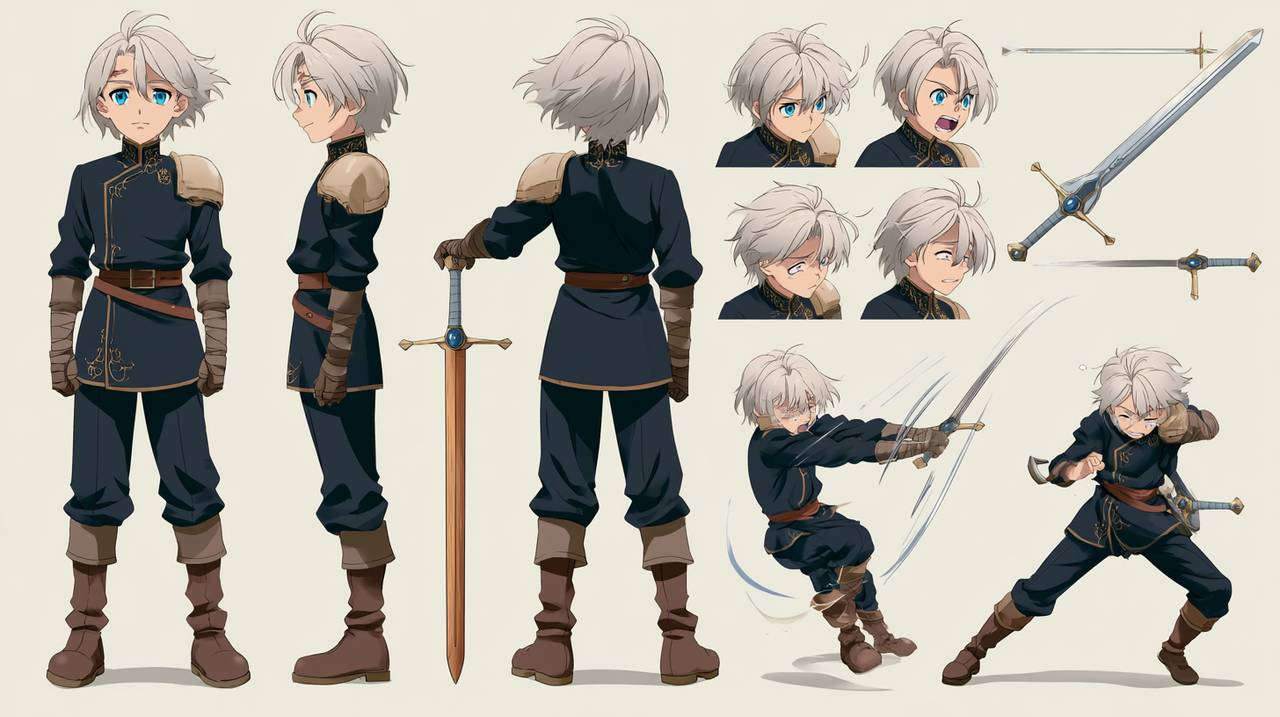
Darven's multi-view character design and action references. View the full prompt in the Gallery
The Six-Layer Structure of AI Character Design
A generative and reusable character design can be organized by the following priorities:
LayerContent to WritePotential Issues to CheckIdentity CoreAge group, occupation, world-building, archetypeIf the name were removed, would the character still have a clear identity?Body SilhouetteSense of height, build, proportions, postureCan they be recognized when reduced to a black silhouette?Face & HairFace shape, eye shape, hairstyle, fixed identifying featuresAre there only a few, but stable, characteristics?Clothing SystemSilhouette, primary/secondary colors, materials, structureDoes the clothing serve the identity and actions?Props & SymbolsWeapons, tools, accessories, personal marksDoes each item have a function or story?Behavioral ExpressionNeutral expression, habitual movements, emotional rangeDo they still look like the same person when their pose changes?
Avoid turning every layer into a keyword repository. One primary silhouette, one main color, one accent color, and one signature detail are often easier to control than ten synonymous adjectives. OpenAI's image prompting guide also emphasizes the importance of clear descriptions: prompts don't need to be excessively long; first state the subject, purpose, and key constraints, then revise iteratively.
Systematize Colors, Clothing, and Props
"Wearing futuristic clothing" is still too vague. A more effective approach describes how the clothing is composed:
Main color: deep navy blue; secondary color: off-white; accent color: safety orange
Silhouette: short broad-shouldered jacket + tapered cargo pants, forming a wide-top, narrow-bottom outline
Materials: matte waterproof fabric, partial rigid armor plates, brushed metal buckles
Fixed identifiers: orange cord knot on the left shoulder, worn leather bracer on the right wrist
Function: lightweight and easy to climb in; no heavy armor or unnecessary cape
This description provides color hierarchy, silhouette, materials, identifying features, and exclusions. The Professional Character Design Board in the Gallery further breaks down full-body turnarounds, head angles, expressions, and details onto a single design board, illustrating that character design should describe "what it is" and specify "how to verify."

Character turnarounds, head angles, and material details can be placed on the same verification board. View the full prompt in the Gallery
Use Character Design Sheets for Verification, Not Decoration
After defining the character, generate a neutral design sheet first, without rushing into complex scenes. A basic version should include:
-
Front, side, and back full-body turnarounds;
-
Front, three-quarter, and side profile headshots;
-
Neutral, smiling, angry, surprised, sad, focused, and other expressions;
-
Breakdowns of clothing structure, key accessories, materials, and color palettes;
-
White or light-colored background, eye-level camera, neutral studio lighting, consistent aspect ratio.
Elegant Character Design Sheet is a complete example: it consolidates age, height, appearance, temperament, main color scheme, turnarounds, six expressions, clothing and accessory breakdowns, color palette, and negative constraints into a single template. The real value here isn't the fancy layout, but that each item can be checked against the visuals.

From basic information to color schemes and expressions, each section in the design sheet corresponds to a verifiable item. View the full prompt in the Gallery
If reference images already exist, treat them as identity anchors and specify separately which information comes from the reference and what is allowed to change. Different models support reference images differently; for example, Google's Imagen 3 subject customization docs recommends reference images with faces centered, close to front-facing, and unobstructed. Actual usage should still be based on the current model's documentation and interface limitations.
Directly Adaptable Character Design Prompt Template
Create a professional character design sheet.

[Identity Core]
Character type: [profession / faction / world setting]
Age stage: [clearly specify child, teenager, or adult]
Character archetype: [one-sentence positioning]
Personality and goal: [2-4 keywords + current goal]

[Visual Definition]
Body silhouette: [sense of height, build, proportions, posture]
Face: [face shape, eye shape, fixed identifiers]
Hair: [color, length, parting, texture]
Costume: [silhouette, main color, secondary color, materials, structure]
Props: [key items and their purpose]

[Output Requirements]
Full-body three-view turnaround of the same character: front, side, and back;
three head angles; six expressions; costume and prop details; color palette;
eye-level orthographic view, neutral standing pose, clean light background, neutral studio lighting;
keep the same face shape, hairstyle, body proportions, and costume structure across all views.

[Constraints]
No extra characters, no extreme perspective, no obscured body parts,
do not change age, hairstyle, color scheme, accessory placement, or costume structure,
no complex scenes, do not use lighting and shadows to hide design details.
Common Failure: Lots of Information, Yet the Character Remains Unclear
The most common issues fall into four categories: conflicting personality keywords, clothing irrelevant to occupation, too many signature details, and placing camera angles, environment, or rendering quality before character identity. When revising, don't rewrite entire sections; first check the four high-priority layers—identity, silhouette, face/hair, and clothing—adjusting only one variable at a time.
Also, distinguish between "character definition" and "character consistency": definition clarifies who the character is, while consistency ensures the established character remains stable across different images, angles, and scenes. Without a clear definition, there are no stable standards to lock onto for consistency.
Organize Character Definition into Your First Prompt Version
First, use the six-layer structure to create a one-page character profile, then generate a neutral design sheet to check silhouette, proportions, clothing, and expressions. Only after the basic design is established should you place the character within the narrative and camera shots. You can organize character identity, visual anchors, output format, and constraints in Genvizu AI Image Prompt Generator to complete your first version of a reusable character design prompt.


