Crafting Effective AI Poster Prompts: Subject, Contrast, and Layout for Editorial Visuals
Learn to write AI poster prompts that go beyond keyword stuffing. Focus on subject, contrast, and layout for stable, editorial-quality visuals with Genvizu.
 Genvizu Team3 min read
How to Write AI Poster Prompts: Use Subject, Contrast, and Layout for Editorial Visuals
Effective AI poster prompts don't just stack up terms like "high-end, cinematic, 8K." Instead, they break down the poster into actionable design decisions: Who is the sole subject? How is the subject highlighted? Where is the text placed? How does the background make space? Once these four aspects are fixed, the generated results are usually more stable than keyword stuffing.
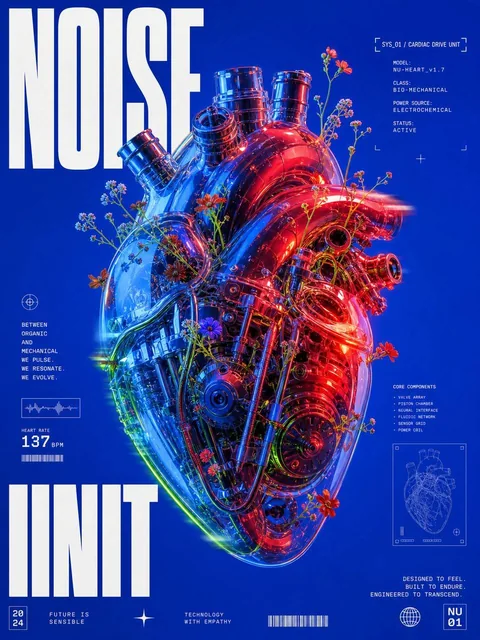
This Mechanical Heart Poster gallery example is great for deconstruction. Instead of just saying "futuristic tech poster," it clearly defines a translucent mechanical heart, internal metal structures, wildflowers, electric blue and saturated red dual lighting, a pure blue background, and an editorial layout area around the subject. The image is complex, but the information hierarchy is clear.
Step 1: Start with a Visual Statement
Begin by answering one question: What should the viewer remember at first glance?
For example, "The symbiosis of a mechanical heart and wildflowers" is a visual statement. It includes both the subject and a conflict, providing more direction than "Create a tech poster." You can draft using the following structure:
[core subject], combined with [a contrasting element], expressing [theme or mood]
Contrasts suitable for posters can arise from nature vs. machinery, softness vs. hardness, classical vs. futuristic, or a small subject in a vast space. Keep only one primary conflict at a time; otherwise, the model might make every element equally eye-catching.
Step 2: Detail the Subject Visually
Google's Imagen prompt guide emphasizes subject, background environment, and style as key descriptive dimensions. For posters, the subject description should at least include:
-
Form: Close-up, full object, cross-section, or translucent structure.
-
Material: Metal, glass, paper, fabric, or liquid.
-
Surface: Matte, mirrored, scratched, wet, or translucent.
-
State: Still, suspended, broken, pulsating, or intertwined with plants.
"A translucent mechanical heart showing internal metal chambers, cables, and valves" is more likely to yield controllable results than "an exquisite mechanical heart." Adjectives set the tone, but nouns and structural details truly define the image.
Step 3: Maintain a Single Primary Color Relationship
Posters need to be recognizable even at small sizes. The simplest method is to specify a clear color system, such as:
-
Duotone contrast: Electric blue + saturated red.
-
Monochromatic subject + highlight outline: Black subject + fluorescent green outline.
-
Neutral background + brand accent color: Gray-white background + brand red.
Avoid requesting pastel, neon, vintage film, metallic silver, and warm gold simultaneously. More colors make it harder for text and the subject to establish priority. You can add "high contrast" and "clean saturated background" to make the outlines more suitable for subsequent cropping and layout.
Step 4: Treat Layout as Space, Not a Wish
AI-generated text can still have spelling or glyph issues. A more reliable approach is to first ask the model to reserve layout areas and then add the final copy in a design tool. The prompt can be written as:
large editorial headline area around the subject,
clean negative space on the upper left,
small technical caption blocks aligned to a grid,
typography must not overlap the subject
If text generation is necessary, limit it to a short title and specify the word count, position, font weight, and contrasting color. Do not ask for a title, subtitle, price, date, and multiple paragraphs to be accurately rendered in the same image.
Step 5: Use Camera and Lighting for Texture
Poster prompts don't always require photography parameters, but camera language helps the model understand subject scale. Close-ups are good for emphasizing material, centered front views are suitable for product launches, and low angles can create a sense of power. Lighting is responsible for separating layers: rim lighting for outlines, soft light for transparent materials, and hard light for graphic shadows.
A reusable AI poster prompt formula is:
[visual concept] + [subject structure and material] + [composition and white space]
+ [primary color relationship] + [typography area] + [lighting and finish]
First, generate the main visual without complex text, confirm the subject, contrast, and whitespace, then gradually add layout requirements. Modifying only one variable per iteration makes it easier to determine which instruction improved or cluttered the image.
Generate Your Poster Prompts with Genvizu
Provide your product, event theme, and target style to Genvizu AI Image Prompt Generator to get clear, structured poster prompts, then fine-tune colors and layout space based on the generated results.