Monocolor Editorial Print: A Duotone Poster Skill on the Genvizu Canvas
A new Genvizu canvas Skill turns one- and two-ink printing into parameters: 17 fixed-hex ink recipes, 9 layout families, print era and visual tension.
 Genvizu Team6 min read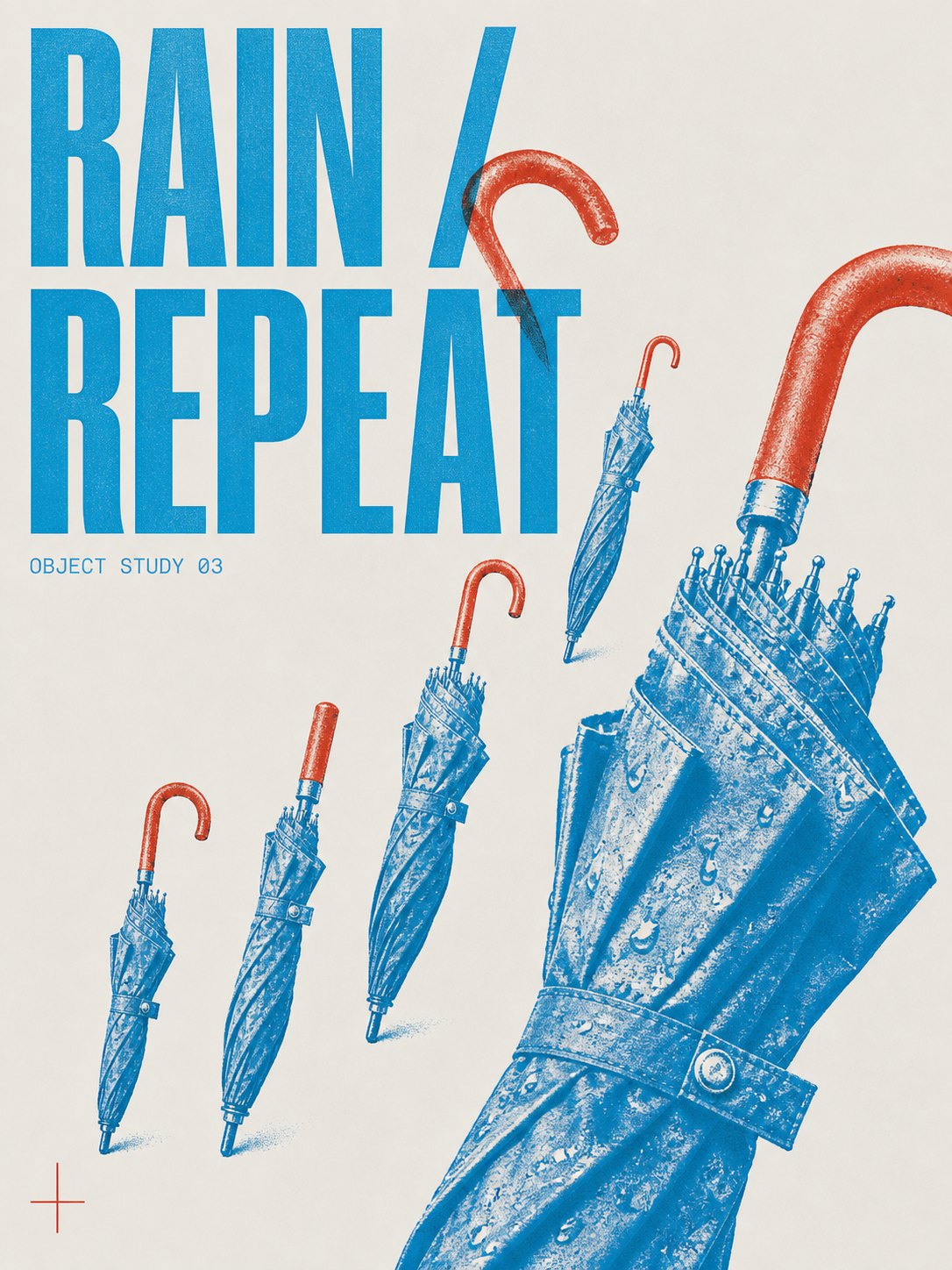
There is a new Skill on the Genvizu infinite canvas: Monocolor Editorial Print. It builds one thing — a page that behaves like an actual printed poster. At most two inks, laid on neutral paper stock, with the image reproduced as halftone plates, type cut back to a headline and a few lines of microcopy, and a large field of paper left visibly empty.
The Skill turns that discipline into four choices: 17 ink recipes with fixed hex values, 9 layout families, 3 print eras, and 4 levels of visual tension, plus an optional line of display text. Pick, brief, generate. No prompt writing.
Close to the Cyan + Brick Red recipe in the Object field layout: one umbrella repeated five times at rising scale, the largest one cropped hard by the paper edge, the headline threading between the handles.
Why this look is hard to get out of an image model
"Risograph style" reads like a filter, and most tools treat it as one — grain, a halftone screen, a colour wash on top of a photograph. That is not what makes a two-ink poster work. Three things do.
The inks have jobs. The dominant ink carries the image and the structure; the accent ink does exactly one thing — a date, a number, a single circled object. The moment the accent ink spreads across the page, the poster collapses into a cheap duotone gradient.
The image is mechanically reproduced. Visible dots up close, dense shadows where ink pools, dry-edge breakup, a little registration drift. That is separation, not a colour overlay.
The empty paper is deliberate. Paper is a compositional element with a budget, not the space you failed to fill.
Getting all three from a hand-written prompt means specifying ink ratios, where the accent may appear, screen coarseness, crop position, margin width, and how the headline bites into the subject. Miss one and the page drifts. Change the subject and you rewrite everything, and the two posters no longer look like the same series.
17 ink recipes, with the hex written down
Recipes come in two kinds. Two-ink recipes run a dominant ink at 70%–85% and an accent at 15%–30% in a single role. One-ink recipes carry image, type and rules with a single plate, using density alone.
| Recipe | Dominant | Accent | Suited to |
|---|---|---|---|
| Powder Blue + Signal Red | #9EB8D3 |
#C83232 |
Guides, announcements, information-dense pages |
| Cobalt + Terracotta | #2148B8 |
#C65F38 |
Travel, summer, food, lifestyle |
| Botanical Green + Oxblood | #008A4B |
#8F3434 |
Plants, natural wine, bookshops, archives |
| Charcoal + Signal Red | #30343A |
#C83232 |
Architecture, exhibitions, reports |
| Electric Blue + Carbon | #173AE3 |
#242321 |
High-contrast cultural events, image-led pages |
| Mint Green + Charcoal | #5EB783 |
#302D2E |
Journals, essays, long-form reading |
| Ultramarine + Safety Orange | #263E99 |
#E55D2B |
Movement, objects, youth, urban subjects |
| Cyan + Brick Red | #159DDA |
#B64032 |
Repeated products, exhibitions, playful information |
| Tangerine + Slate Blue | #E46C2D |
#4773A5 |
Markets, festivals, notices, big type |
| One ink — Cobalt | #2148B8 |
— | Technology, knowledge, cities, music |
| One ink — Royal Blue | #2058D4 |
— | Youth culture, fashion, energetic pages |
| One ink — Botanical Green | #008A4B |
— | Botanical, ecological, archival subjects |
| One ink — Mint Green | #5EB783 |
— | Observation journals, quiet natural subjects |
| One ink — Terracotta | #C65F38 |
— | Classical art, food, travel, tactile objects |
| One ink — Signal Red | #C83232 |
— | Declarations, music, events, civic culture |
| One ink — Aubergine | #63365F |
— | Literature, cinema, night, intimate subjects |
| One ink — Charcoal | #30343A |
— | Architecture, photography, restrained publishing |
Leave it on Auto (recommended) and the Skill picks the nearest recipe for your subject. Plain colour words in your brief get mapped to specific inks, so "blue and orange" resolves to Cobalt plus Terracotta rather than to whatever blue the model feels like. The paper stock is fixed too: Neutral White #FAFAF7 by default, Cool Gray #E9E9E5 for architecture and technology, Pale Beige #F5F1E8 for tactile, food and travel subjects. Nothing is yellowed unless you ask for aging.
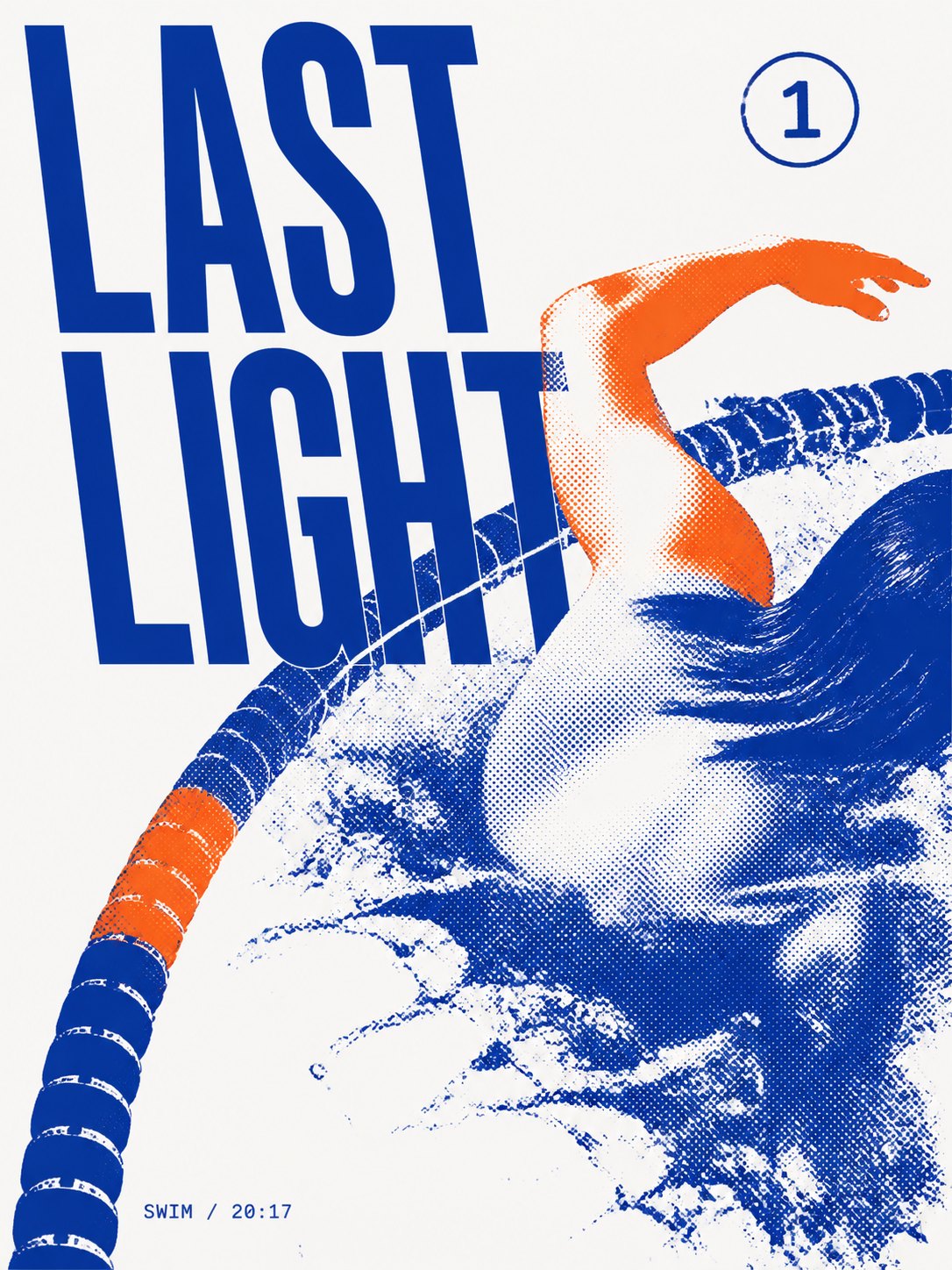
Ultramarine + Safety Orange in the Editorial cover layout. The orange appears on one arm and one short stretch of lane rope; everything else is built from the density of a single blue plate.
9 layout families, deciding where things sit
| Layout | What it does |
|---|---|
| Image field | A large screened image crosses a paper edge, the headline locking onto it |
| Specimen annotation | One to three cut-out objects with numbered labels orbiting them |
| Type-led declaration | The headline is the subject; a smaller image interrupts or grounds it |
| Ruled information poster | Thin rules form one metadata band — events, methods, notices |
| Archival plate | A small indexing title, one rectangular plate, a disciplined caption block |
| Editorial cover | Title near an edge, one dominant image zone, sparse issue-like microcopy |
| Object field | One object repeated at varied scale and angle to build a printed rhythm |
| Overprint collage | Two plates carry separate layers and cross only in selected zones |
| Editorial journal | One photograph, a strong title or date, two or three readable columns |
Two more parameters change the temperament rather than the skeleton. Print era offers Contemporary (clean separation, the default), Tactile risograph (coarse screening, uneven coverage, registration drift), and Vintage — the only setting where aged paper and archival artifacts are allowed. Visual tension runs Auto, Relaxed, Balanced, Assertive, and "relaxed" here does not mean weak: it means one strong focal event plus one visibly quieter release zone, rather than everything being small and even.
Display text is an optional field of up to 120 characters. Whatever you type is printed verbatim, in its original language, as the headline that collides with the subject. Leave it blank and the model writes its own short phrase, or use the AI assist beside the field to draft one.
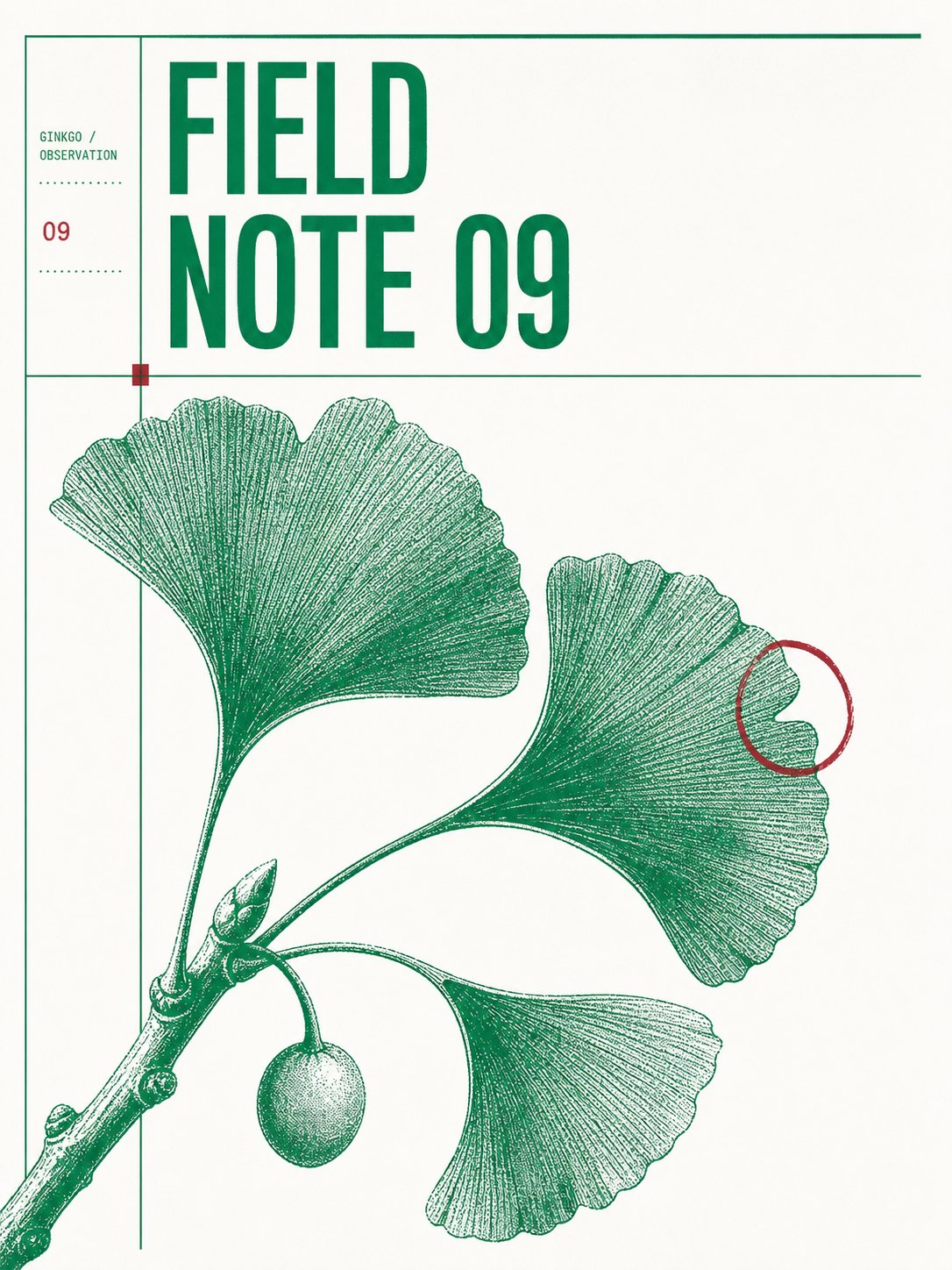
Botanical Green + Oxblood in the Archival plate layout. The red ink appears exactly three times — a number, a small square, one annotation circle — while the green plate does all the engraving.
Running it on the canvas
- Open the Genvizu infinite canvas, right-click (or double-click) on empty space and choose Skills;
- Find Monocolor Editorial Print under the Design category;
- Pick an ink recipe and a layout family, or leave both on Auto, then adjust print era and tension if you want;
- Write a one-line brief naming the subject and the occasion — "ginkgo observation note, number 09" is enough detail;
- Optionally attach one reference image, then generate.
It defaults to GPT Image 2 at 2:3 and 2K — poster proportions and a usable delivery size.
Attaching a reference image does something specific: it does not repaint your photo into a different scene. It treats the photo as artwork going to press. The subject and its facts stay intact, and only the reproduction changes — separation, screening, crop and paper. Shoot an object, an event, or a product, and you get a printed version of that same thing.
When to reach for something else
This Skill has opinions, and it refuses a list of things: a third ink, gradients, neon, full-colour photography, 3D depth, cinematic lighting, hard shadows, card grids, centred symmetry, and any logo, URL, QR code or marketing slogan. If you need a full brand palette, a placed logo, or the information density of an e-commerce banner, this is the wrong tool. It is built for exhibition posters, bookshop and market notices, column covers, observation notes, and record or gig material — work that wins by restraint.
To see what other canvas styles produce, browse the inspiration gallery; plans and credits are on the pricing page.
Credit: this Skill is adapted from the open-source project yanliudesign/mono-color-skill (MIT licence).
Print one on the canvas
Pick an ink, pick a layout, name a subject, and let the plates do the rest — open the Genvizu infinite canvas