

Crafting AI Video Camera Movement Prompts for Stable Single-Shot Dynamics
Learn to write effective AI video camera movement prompts that clearly define subject actions and camera paths for stable, dynamic single-shot videos. Master prompt structure for precise visual storytelling.
 Genvizu Team3 min read
AI Video Camera Movement Prompts: Clearly Define Camera Paths for Stable Single-Shot Dynamics
An effective AI video camera movement prompt should describe both "how the subject moves" and "how the camera observes," ensuring these do not conflict. For a few seconds of a single shot, choosing a clear camera path is often more stable than continuously adding push-ins, pull-outs, pans, tilts, and orbits.
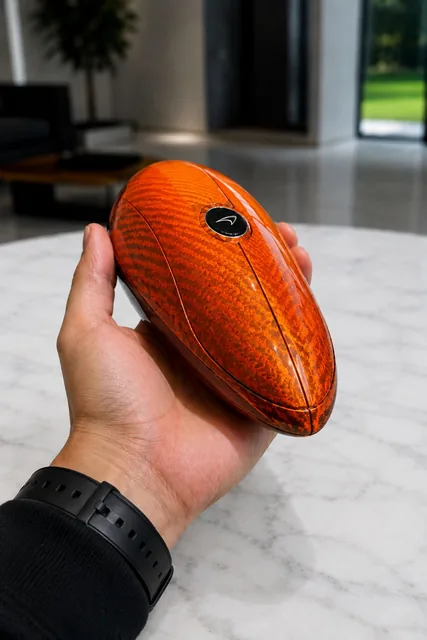
This mechanical transformation gallery video uses clear motion logic: the hand places the mechanical cabin on the white table and retracts, the panels unfold sequentially, the vehicle structure forms and locks, and finally, the camera slowly approaches to show details. It avoids changing camera direction with each action, keeping the subject's transformation the visual focus.
First, Distinguish Subject Actions from Camera Movement
The following two sentences describe different levels:
Subject action: mechanical panels unfold, wheels extend, the car body structure locks into place
Camera movement: handheld POV stays steady, slowly drifting forward at the end
If you only write "dynamic, cinematic, fast," the model doesn't know whether to move the subject, the background, or the camera. First, list the subject's starting state, key actions, and ending state, then select the camera path separately. This makes the visual causality clearer.
For a Short Shot, Use Only One Primary Camera Movement
Common camera movements can be chosen based on narrative purpose:
Camera MovementSuitable Forslow push-inEmphasizing revelation or emotionpull-backShowing environmental scale or hidden informationtracking shotFollowing a person, vehicle, or animalorbitShowcasing product form or dramatic momentshandheldCreating a sense of immediacy, first-person perspective, and slight instabilitylocked cameraHighlighting subject action and avoiding screen drift
Runway's Camera Terms, Prompts, & Examples provides prompt examples for different camera terms and suggests describing what will be seen or revealed at each stage as the camera moves through the scene. The key is not to use more terms, but to align the camera path with the information revealed.
Describe the Beginning, Middle, and End
"Camera moves forward" is still too vague. A more actionable way to write it is:
Start: medium handheld POV above a clean white tabletop.
Path: camera remains centered while the pod unfolds.
End: slow 5% push-in toward the completed car, full vehicle stays in frame.
Define the initial composition, the relative relationship between the camera and subject during the middle phase, and the final position. Adding constraints like "full subject stays in frame" or "stable horizon" can reduce issues like the subject being cut off or the horizon tilting at the end.
Use Continuity Constraints to Avoid Deformation and Drift
When the subject itself deforms, rotates, or moves rapidly, clarify which attributes cannot change. The mechanical deformation example fixes the orange forged carbon material, the white tabletop, lighting, perspective, and proportions. Reusable continuity checklists include:
-
same material and color throughout
-
stable environment and lighting
-
consistent scale and perspective
-
no object duplication
-
final object facing the camera
-
no text or watermark
Don't just write "maintain consistency" once. For the most important material, character, or product orientation, confirm it again in both the action description and the final state.
Control Speed and Visual Hierarchy
Speed terms should correspond to specific parts: the subject unfolds rapidly, but the camera slowly approaches; the character runs, but the camera follows smoothly; particles float slowly, but the main action occurs at real-time speed. Having all elements move quickly will make the short film lose focus.
An effective structure is:
[aspect ratio and shot type] + [subject starting state]
+ [a single continuous action chain] + [one main camera movement and speed]
+ [environment and lighting] + [continuity that must be kept]
+ [a clear ending frame] + [results you do not want]
After generation, first assess the action logic, then the art style. If the action is incorrect, reduce the number of events or simplify the camera movement. If the action is correct but the quality is insufficient, adjust the lighting, materials, and colors. Trying to modify everything at once makes it difficult to know which instruction was effective.
Generate Your AI Video Camera Movement Prompts
Input your subject, actions, and desired camera feel, using Genvizu AI Video Prompt Generator to structure the initial composition, camera path, continuity, and final shot.


