

AI Video Storyboarding: Crafting 15-Second Short Film Rhythms with Timelines
Learn to break down short films into timed segments for AI video generation. This guide focuses on assigning narrative tasks to specific time blocks, optimizing prompts for clarity and impact.
 Genvizu Team3 min read
When short films involve multiple scenes, AI video storyboarding prompts should divide the narrative into time segments, with each segment accomplishing a single storytelling task. Instead of writing a lengthy description like "epic, intense, cinematic," it's better to specify what to see from 0 to 3 seconds, what happens from 3 to 6 seconds, and how the final shot concludes.
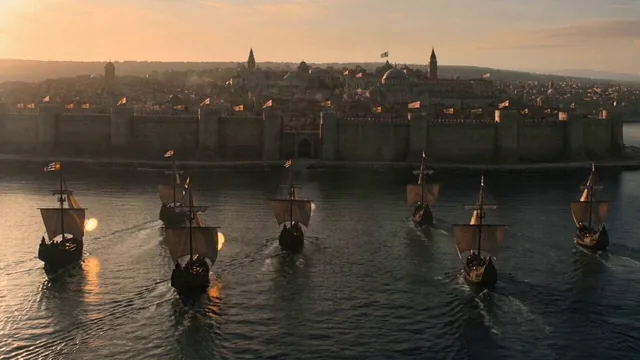
This 15-second historical scene gallery video divides the content into five 3-second segments: fleet arrival, city walls under attack, breaking through defenses, merchants loading goods, and fleet departure. Regardless of whether the specific historical narrative requires further fact-checking, this timeline structure is worth emulating because each segment has a clear action and visual objective.
Start with a One-Sentence Story Summary
Before storyboarding, write a story summary that includes a "beginning, change, and result":
A fleet arrives at a city at dawn, breaks through its defenses, and finally leaves the burning harbor laden with spoils.
If a single sentence already contains five or six plot twists, the short film likely won't have enough space. 15 seconds is more suitable for one event, one change, and one conclusion, rather than fully recounting a complex historical period.
Allocate Time by Narrative Task
A simple 15-second rhythm can be structured as follows:
TimeTaskCommon Shots0-3 secondsEstablish location & conflictWide shots, environment, main parties3-6 secondsFirst actionApproach, initiation, collision, or discovery6-9 secondsEscalation of changeBreakthrough, chase, twist, or revelation9-12 secondsResult appearsClose-up reaction, key object, or cost12-15 secondsConclusion & memorable pointFinal pose, long shot, product, or CTA
Each segment should answer three questions: Where is the camera looking? What is the subject doing? What happens by the end of this segment? Avoid filling in colors, materials, and effects for now; focus on ensuring the story is understandable.
Use Consistent Fields for Each Storyboard Frame
A unified format prevents missing key information:
[00:00-00:03]
SHOT: wide establishing shot
SUBJECT: fleet approaches the city walls at dawn
ACTION: ships advance while defensive banners move in the wind
CAMERA: slow aerial push forward
TRANSITION: smoke fills frame and masks the cut
Continue using SHOT, SUBJECT, ACTION, CAMERA, and TRANSITION for subsequent frames. With a consistent structure, it's easier to identify if a segment is overloaded with actions or if there's a missing connection between two segments.
Establish Rhythm with Shot Scale Changes
Five consecutive wide shots can make an event feel emotionally distant, while five consecutive close-ups can lose spatial context. Use a sequence like "wide shot to establish the environment, medium shot to show action, close-up to confirm the result."
Camera movement should also follow the segment's function: establishing shots can have slow pushes, action segments can use tracking shots, and result segments can be static or have slow zooms out. Runway's AI Video Prompting Guide reminds us that including multiple competing camera directions in a single prompt can lead to chaotic results. One of the values of storyboarding is assigning different camera movements to different shots, rather than cramming them into a single moment.
Transitions Must Have Visual Basis
"Cinematic transition" doesn't explain how to transition. A more practical approach is to have elements within the frame obscure the lens, such as smoke, a rapidly passing person, a swinging piece of clothing, bright light, or motion blur. Connecting to the next shot with similar colors, directions, or shapes enhances continuity.
Common phrasing includes:
-
smoke fills the frame, revealing the next location
-
whip pan right into the next shot
-
foreground object briefly occludes the lens
-
match cut from a circular wheel to a setting sun
If the model or current generation mode is not adept at multi-shot sequences, you can generate each segment separately and then combine them in editing software. Storyboarding remains useful because it aligns the start, end, and motion direction of each piece of footage in advance.
Separate Fact-Checking from Visual Generation
Videos about history, science, product features, or news cannot solely focus on visual impact. Before generation, separately verify characters, locations, times, clothing, logos, and causal relationships; do not treat the narrative from gallery examples as factual sources just because they can be generated.
Perform two rounds of checks after completing the prompts: the first round should focus only on content accuracy and whether the timing is feasible; the second round should then examine camera work, style, lighting, and sound. This prevents using extensive visual details to mask narrative errors.
Generate Your AI Video Storyboard Prompts
Input your one-sentence story, duration, and target aspect ratio into Genvizu AI Video Prompt Generator to first obtain an executable timeline, then adjust actions, camera movements, and transitions frame by frame.


